

I’ve been frustrated so many times, putting a bunch of data into a calculator only to find out the results are totally useless.
Too many tools are either overly simple, overly complex, or use assumptions that don’t match my situation.
To make financial decisions, tools matter. You need good data to make good decisions.
Today I’m going to share some of my favorite tools. These are the ones I use over and over again because they’re accurate and they work.
If you have the right tools and understand a few fundamental concepts, that’s all you need to build Life Changing Wealth.
Note: I have no affiliation with any of these tools. I just really like them.
1. Tracking cash flow and net worth: Empower
We can’t grow what we don’t understand.
As we advance up the rungs of financial mastery, we inevitably accumulate a few accounts: credit cards, savings accounts, IRAs, 401(k)s, HSAs, and brokerages.
Tracking them all in one place is the only way we can get a full picture of how much money is coming in, how much is going out, and how much we’re saving.
When we have that full picture we can make better financial decisions. (That’s why this is the second step in my Ten Steps to Life Changing Wealth.)
The tool I use for this is Empower (formerly Personal Capital). After you link your accounts, it automatically pulls the data together to show net worth over time, income and spending breakdown, and other helpful features like asset allocation, budgeting, and more.
What I like:
It’s free. Now that Mint is dead, it seems to be the only good free option.
The net worth chart over time. Watching your number climb is incredibly motivating.
The cash flow tool. You can see how much is coming in and going out without having to build budgets or track every detail yourself.
The asset allocation view, which pulls every 401(k), IRA, and brokerage into one allocation picture. You can directly see how much you have in stocks vs. bonds, international vs. domestic, and more.
What I don’t:
They will call you and pitch their advising services. I politely declined once, and they haven’t bothered me since, aside from a few on-screen offers.
They have some other built-in tools that I want to like more, like the investment checkup and retirement planner, but they’re either overly simple or just not necessary.
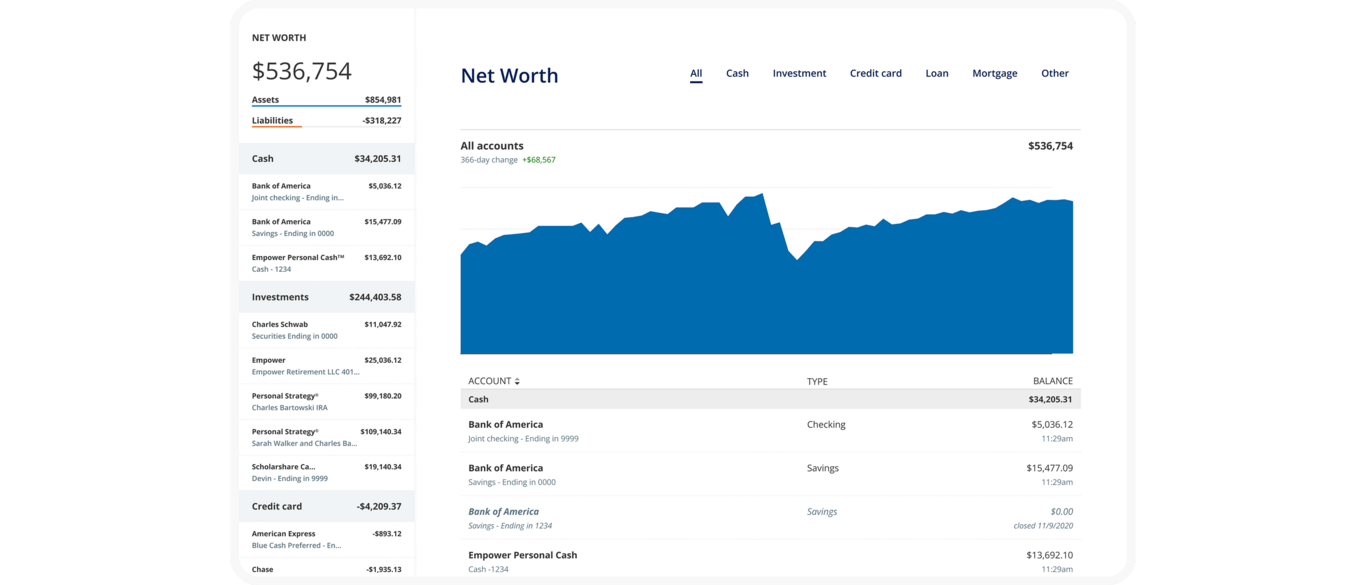
Alternative: Monarch ($14.99/mo). If you’re annoyed by Empower’s advisor sales, it’s a good option, but not free. When I tested it, the account integrations failed more often. That was a while ago, so it could be fixed now.
2. Deciding to buy a home: NYTimes Rent vs. Buy
Way too many people buy a house because they’ve been indoctrinated that real estate is always a good financial decision. It is absolutely not always the case. It is sometimes the case.
The only way to know is to run the numbers.
Outside of having kids, whether to buy a house and how much house to buy is probably the biggest financial decision most people make, so it’s important to get it right.
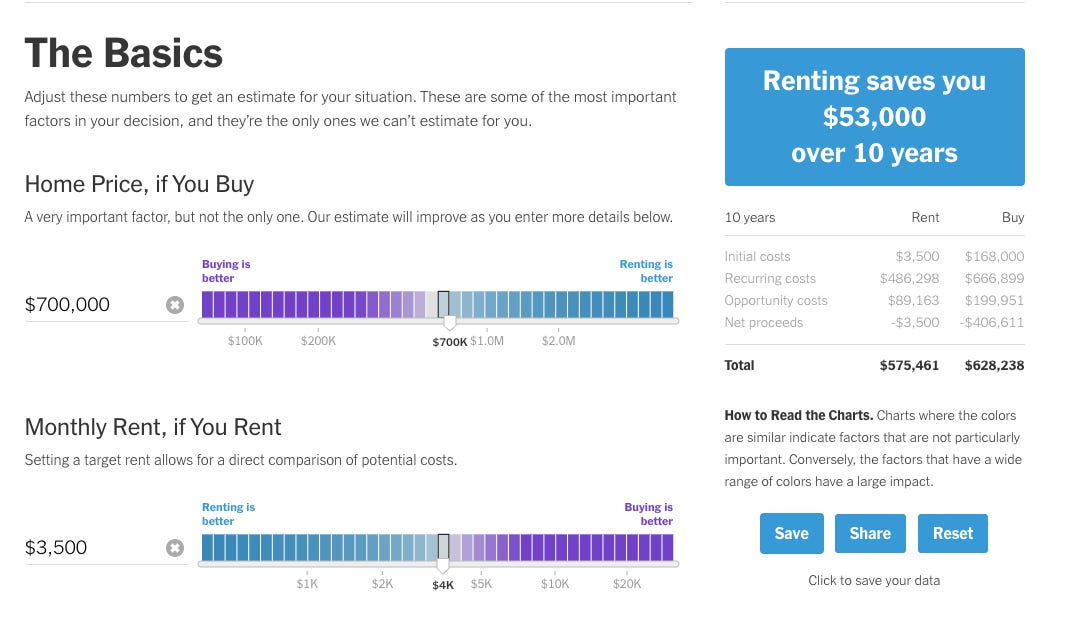
The NYT Rent vs. Buy Calculator is an amazing tool for this. I love it. It actually answers the question in a comprehensive but still user-friendly way. When financial tools can do both, I’m immediately smitten.
What I like:
It includes maintenance, transaction costs, appreciation assumptions, tax treatment, and all the key information.
Most importantly, it calculates the opportunity cost. That’s the return on the money you could have invested instead of buying.
The default assumptions on inflation, housing growth, and property taxes are all pretty good, and regularly updated.
It’s easy to use and the sliders can help you do ‘what-ifs’ pretty quickly. As in - “what if I bought a less expensive house?” This can be helpful if you’re house hunting and comparing options.
What I don’t:
The NYT tool doesn’t show your monthly payment. It surprises me, because it would be so easy for them to add it.
Bonus tool: Bankrate’s Mortgage Calculator calculates your monthly payment including principal and interest (exactly), plus property tax, insurance, PMI estimates and amortization tables.
It’s a helpful complement to the New York Times tool, so you can actually see how it affects your monthly cash flow.
3. Building a portfolio: TDF + Portfolio Visualizer
Building a portfolio is easy to overcomplicate and overthink.
There’s an overwhelming number of investment options and too many unreliable people online sharing conflicting opinions as if they were facts.
The reality is, all we need is a diversified portfolio with low fees. That’s it. Then start investing as much as we can in it.
How much money we invest matters so much more than the details. Details like how much international stock we hold or whether we put some money in gold or private equity dwarf in comparison.
And that’s why the first tool I’m going to highlight here is different from the rest. It’s not a calculator or app.
It’s a Target Date Fund.
They do exactly what we need and nothing more.
They have super low fees. They buy a fully diversified mix of global stocks and bonds. They even rebalance themselves on autopilot.
Vanguard’s Target Retirement Funds or Fidelity’s Freedom Funds are good options that do the same thing. Just pick the one closest to your age.
I still own these funds even though parts of my investment portfolio have become more sophisticated.
But what if you want to optimize your portfolio?
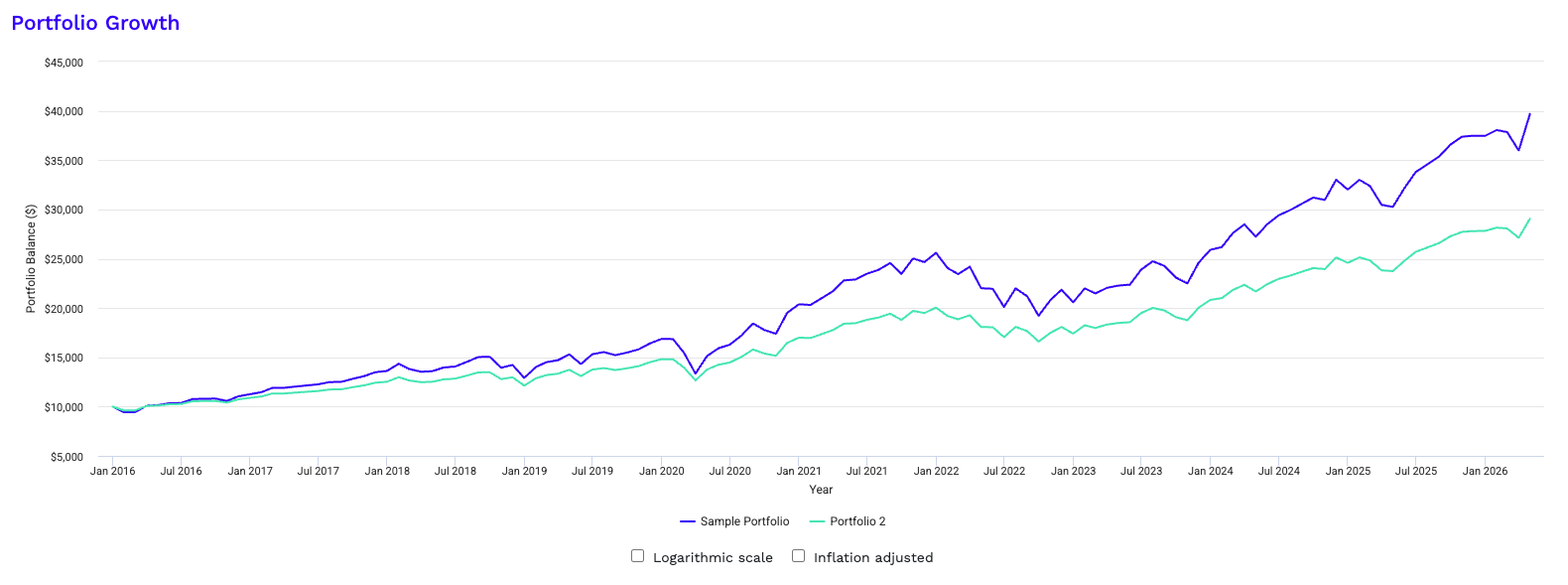
Portfolio Visualizer is the tool I use to understand different portfolio options or investment choices.
It shows you how different asset classes and portfolios would have performed historically.
What I like:
You can compare multiple portfolio options to see what mix lets you sleep at night without giving up too much return.
You can see how wild your stock market portfolio might swing by looking at how far down it went in periods like 2008-09.
You can see how much it costs you to leave cash on the sidelines by comparing portfolios with different cash allocations.
What I don’t:
It can create the temptation to over-optimize. It’s easy to spend more time tinkering with the tools than actually investing. (To be fair, that’s a risk of a lot of these tools.)
4. Planning when to retire: 25x, FiCalc, + Projection Lab
I wrote recently about how important it is to know what we’re working toward: both what number is enough and what life we want to live.
I’m going to give you three tools to help you figure out how much you need.
The first is the one I shared recently, the 25x rule.
The 25x Rule: Take your annual retirement spending and multiply by 25. That’s how much you need to be able to be completely financially independent and stop working.
It’s a simple rule that’s good enough for most cases, particularly if you’re pretty far away from retirement.
If you’re getting closer and want to get more detailed, my next recommendation is FiCalc.
FiCalc (ficalc.app): You enter your portfolio, your spending, and your retirement horizon, and it runs your plan against every 30-year period in US market history so that you can see how often it would have failed.
What I like about FiCalc:
It’s clean, fast, free.
You can easily see accurate historical drawdowns.
You can see the probability of your plan’s success based on history.
What I don’t:
It models one portfolio and one withdrawal rule. If you want to test “what if I work three more years, what if I take a sabbatical at 50, what if my partner stops working at 55,” you need more.
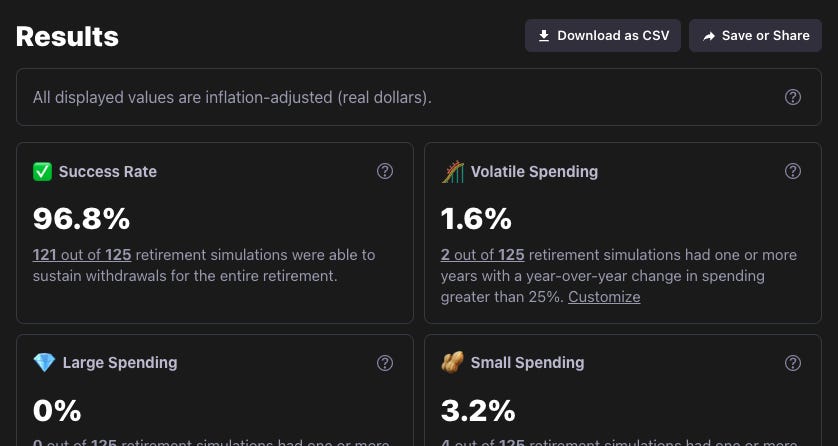
Which leads us to Projection Lab: If you want even more control and flexibility, it is the more powerful option.
But that power comes with tradeoffs. It’s complex. It takes a fair amount of learning and setup. Once you figure it out, it lets you plan projected expenses, income, Roth conversions, Social Security, and more, so you can build a much more detailed retirement plan. However, many features also aren’t free ($9/mo).
5. Understanding Social Security: SSA.tools
As we get further along in our planning and thinking and getting closer to retirement, Social Security becomes an important piece of the puzzle.
My favorite tool to help calculate and optimize Social Security is SSA.tools.
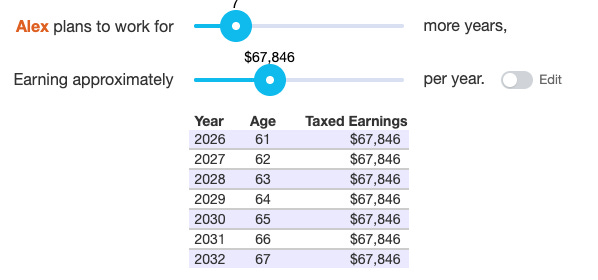
First log into the government’s Social Security website: ssa.gov. There, you copy your earnings history and paste it into SSA.tools.
SSA.tools calculates your Social Security benefit and shows what you’d collect for all of your claiming options between age 62-70.
What I like:
It’s free, open source, and private. Your data isn’t stored or used.
It forecasts your expected Social Security payments at every claiming age.
You can compare different claiming ages pretty quickly.
You can adjust your estimates to model for early retirement.
What I don’t:
You have to copy your earnings record from ssa.gov by hand.
What tools do you use?
After testing more than 50 financial tools, these are the ones I keep coming back to.
What tools do you love?
Please comment and let me know what you use. I’m always looking for helpful new tools.
P.S. Want more strategy behind the decisions these tools support?
I've been using Quicken since 1993. I used to really like it, when I bought a CD at the brick and mortar software store, then installed and owned the software. Now that it's "software as a service" they charge $99/yr (or is it more now?) and want to upload all my data to the cloud where it can be hacked. I've been looking for a replacement but feel locked in. Never did like the portfolio tracking, so I track each portfolio separately and manually update balances from time to time.
Nicely curated, neatly explained. Thanks